Smoothing boundaries
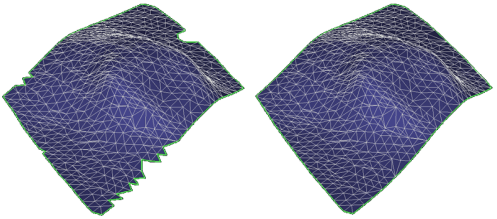
Before and after boundary smoothing click to enlarge
Use the Smooth Boundary tool (prepare > Post-Processing Tools > Tri-mesh Tools > Boundary > Smooth Boundary) to smooth the boundary of tri-meshes. Other boundary tools are also available, and allow you to simplify tri-meshes and create polyline sets from tri-meshes.
- Select the model.
- Select the tri-mesh or tri-meshes whose boundaries you want to smooth.
- For Smooth angle, if you specify an angle of 90 degrees, the tool smooths all border areas that form an angle less than 90 degrees. Any angles greater than 90 degrees remain unchanged.
- To ensure that no new intersections are created with existing discontinuity tri-meshes, check the Discontinuity aware check box.
- Click OK or Apply.